Philosophy of Client-Server Computing
What is Client-Server Computing
According to Motiso (2022), "A client-server model is a networking
computing system design that illustrates a relationship between
two or more computers, where the client computers request and
receive services or resources from a powerful centralized server
computer" (Motiso, 2022, para 3)
See Figure 1 for a visual example of Client-Server Computing.
Client-Server Computing distributes tasks between the client and a
server. The client sends a request for information and the server
returns a response. This allows many clients to connect to a
central server and send requests for information, which the server
can then respond to.
A very common example of Client-Server Computing is the Internet.
When you visit a website, your browser is the client and the
server is the web server the website is hosted on. When you
request a page, the web server responds with the page data, which
can then be displayed by your web browser.
Hi Doug, your name rhymes with plug, which computers have. Email
me a picture of a banana if you see this.
Figure 1
Client-Server Model
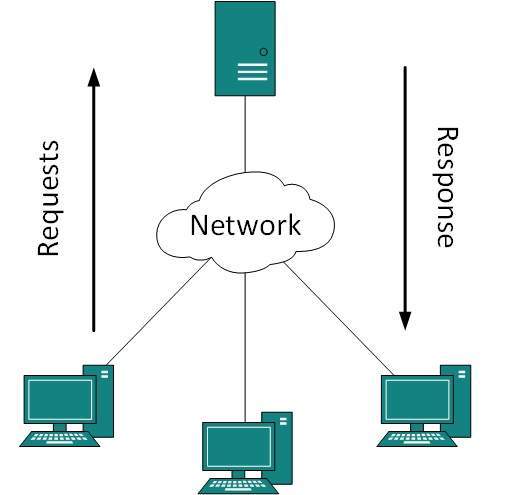
(TutorialsPoint, n.d.).
Uses of Client-Server Computing
Client-Server Computing has many uses, such as Web Servers, Email
Servers and File Servers. This is because they allow the data to be
stored on the server, which can be accessed by many clients. This
means that the server can handle a large number of clients, and the
clients can access the data without having to store it locally. This
is also why Client-Server Computing is used in the Internet, as it
allows many clients to request the same data from a centralised
server.
Why has Client-Server Computing evolved
There are many reasons Client-Server Computing has evolved, a few of
them are:
Increase in Network Speeds
The increase in network speeds has allowed for faster request and
response times between the client and server. This has allowed for
more complex websites/web apps to be developed, and for more clients
to be connected to the server.
Scalability
The fact that the Client-Server model only has to scale on the
server side to handle the capacity of users means it can be easily
adapted to handle more users. This is because the server can be
scaled up by adding more servers to the network, which can then
handle more clients.
Advances in Computer Resources
As computers have become increasingly complex and interconnected,
the Client-Server model has become widely adopted. Clients aren't
just "dumb terminals" anymore and can process a fair amount of data.
There are different styles of Client-Server Computing, such as Thick
and Thin Client Computing.
Advantages and Disadvantages of Different Client-Server
Architectures
There are different ways to structure your client-server
interactions. This is usually described in layers, the presentation
layer being the user interface (what the user is presented with),
the application layer which processes and calculates the data, and
the data layer which stores and retrieves the data. Each
client-server architecture has their advantages and disadvantages.
1 Tier Architecture
1 Tier Architecture is the most basic style of Client-Server
Computing. It is where the client and server are on the same device.
This makes the connection trustworthy as the presentation, business
and data layer are all on your local machine, however, it can be
difficult for the server to do all three tasks if there are a lot of
users connected (Sugandhi, 2023). This kind of system is fine for a
simple application that doesn't need to handle a lot of users, such
as a local music player.
2 Tier Architecture
2 Tier Architecture is where the user interface is stored on the
client system and the server stores the databases (Sugandhi, 2023).
This means that many clients can all connect to the server and
access the same data. The presentation layer is stored on the client
and the data layer is stored on the server (Sugandhi, 2023). The
application layer can either be stored on the client or the server.
If it's on the client, it's called a "thick client" because the
processing is done client-side, and if it's on the server, it's
called a "thin client" because the server does the processing.
Thick Client Computing
Thick Client Computing (also known as a desktop, fat or heavy
client) is a style of Client-Server Computing in which the client
does most of the processing and data storage client-side, even
without a network (Parallels, 2021). This makes the client feel
responsive and have better capability with a limited network
connection and is ideal if the server is slow. However, it isn't
recommended for mobile or remote clients, as they don't have the
processing power or memory capacity to run complex actions.
Thin Client Computing
Thin Client Computing is another style of Client-Server Computing
that relies mainly on a central server to connect to, to process
data and store it. This is because the client is usually a mobile
device, which is accessing the data from a remote location or
doesn't have the processing power to do this (Parallels, 2021).
This means that the client can be used anywhere, and the server
can be scaled up to handle more clients.
2 Tier Architecture is the fastest client-server architecture
because the client and server are in direct communication with each
other (Sugandhi, 2023). This architecture is useful for small
websites where there is little processing of the data. 2 Tier
Architecture isn't recommended for an app that needs to handle a lot
of users and process the data they are sending, as it can slow the
server down. Instead you would use a 3 Tier Architecture.
3 Tier Architecture
3 Tier Architecture is similar to 2 Tier Architecture, except the
application layer is stored a different server to the database
layer, so that both the client and server perform better (Sugandhi,
2023). This approach can be used to make more complex applications,
where you need to separate the data and the processing of the data
so the server can handle more users retrieving data. This may be
expensive and redundant for smaller applications and can lead to
slower response times, as there are more servers to communicate
with.
N Tier Architecture
N Tier Architecture, also known as multi-tier architecture is just
like 3 Tier Architecture, except it separates one of the layers into
multiple, to reduce the load on the server (Sugandhi, 2023). This
could be splitting the application layer to have a caching layer,
which stores data that is frequently accessed, so the server doesn't
have to process it every time, or it could be a security layer,
which checks the data before it is sent to the server. While this
architecture seems like a good idea, it can be difficult to
implement and maintain, as it can be both complicated and expensive
to set up and maintain multiple servers.
Single Pages Applications (SPAs)
What is a SPA
A Single Page Application (SPA) is a web application that only uses
a single HTML page to display content. When a user navigates to a
different page on the app, the page isn't reloaded, instead,
javascript is used to update the HTML page and injects the new
content into the page. Since the entire page isn't reloaded on
navigation, the app feels more responsive. Parts of the site that
are consistent across pages, such as the navigation bar, can be
injected into the base HTML page, so it doesn't have to be copied
and pasted into every page, which makes it easier to update. An
example of a SPA is Gmail, which only uses a single HTML page to
display content.
History and Philosophy of SPAs
History of the SPA
The origins of the SPA are unknown, but an early concept of one was
Stuart Morris' "Self-Contained Website" called slashdotslash in 2002
(Shvartzman, 2014). Technology similar to the modern SPA was also
described later in 2002 in a US patent entitled "Delivery of data
and formatting information to allow client-side manipulation" by
Lucas Birdeau, Clifford Yeh, Michael Peachey and Kevin Hakman (Ćwik,
2021).
Philosophy of SPAs
Single Page Applications are centered around the idea of a
simplistic, responsive and interactive user experience. This is to
make the site seem as seamless as possible, just like an app. Single
Page Applications are designed to be fast and reactive, so that the
user can interact with the site without having to wait for each page
to load. This also means once the app loads, it can be used offline,
as the all data is stored on the client (Churylov, 2023). They are
also designed to be quick to develop, because you can reuse most of
the code across the app. With traditional sites, complete pages have
to be generated for thousands of users, but with SPAs, the renderign
is all done client-side, making the server respond faster (Churylov,
2023).
How they work
SPAs use a base HTML page to load the structure of the app and then
injects components into the parts of the page using javascript. This
is done by using a router to determine which component injects
where. Dynamically swapping out the elements of a singular web page
gives the illusion of a seamless and responsive site akin to a
mobile app. SPAs typically use a framework to make this process
easier, as they have built-in tools to make the development simpler.
An example of a SPA framework is React, which has a built-in router,
which is an easy way to route views and components to different
URLs.
How they differ from traditional web development
Traditional web development usually consists of designing a site
page by page, which can have you copy and pasting elements like the
navigation bar into every page, so when you go to modify it, you
have to change every instance of it. Whereas with SPA development,
you can create a navigation bar in a component and then reference it
where you need it, so when you need to modify it, you only have to
update the component.
Technologies SPAs make use of
HTML, CSS and Javascript/Typescript
HTML, CSS and Javascript are the building blocks with which the vast
majority of websites are built. SPAs are no different, and use these
technologies to create the structure, visual design and
functionality of the app.
REST APIs
REST APIs are used to communicate with the server and retrieve data.
This is done by sending HTTP requests to the server, which then
responds with the data in the form of a JSON object. This data is
then used to update the HTML page.
Server-Side Frameworks
Server-side frameworks are used to create the server that the SPA
communicates with. This is done by creating a server that can handle
HTTP requests and respond with the data in the form of a JSON
object. Frameworks can benefits SPAs by potentially improving
performance and security
URLs
Erwin states that underlying technologies that SPAs use like URLs
are often artificially injected by the browser's History API; this
seems like a hybrid state instead of a long-term solution. The
concept of URLs makes sense for document-based websites but needs to
be rethought from the perspective of SPAs. If not taken care of,
simple features like the forward and back buttons can break the app,
resulting in a bad user experience (Erwin, 2021).
Strengths and Weaknesses
Strengths
SPAs seem faster and more responsive than typical websites because
the entire page isn't reloaded anytime a request is made from the
client. Page elements like the header and footer can be reused
across many pages, eliminating inconsistencies that could arise when
you forget to update certain instances of them in a traditional
website. Reusable components also reduce the development time of
sites, because you aren't updating each instance of it when
implementing new features.
Weaknesses
Most SPAs aren't supported on older browsers and/or browsers that
don't support javascript, this can drive away certain groups of
people, as they can't view any part of your site. They also can be
difficult for search engines to index, meaning your site might not
appear on a search engine like Google, which will make it harder to
find your site.
Business Problems They Are Best Suited To Solve
SPAs are best suited for sites that are data-driven, such as real
estate sites or online stores. This is because they can be easily
updated to display a lot of information which can be formatted by a
template. They are also suited for keeping the flow, for example:
stores where you can browse the store, add items to your cart and
then checkout without having to reload the page once.
REST APIs
What is a REST API
A Representational State Transfer API (REST API) is an application
programming interface (API) that allows data to be transmitted over
a standardised protocol interface like HTML (for web applications)
or SMTP (for email uses) for example, while conforming to the REST
architectural principals. REST APIs are used to perform the four
basic CRUD operations: create, read, update and delete.
Characteristics of a REST API
Resource-Based
REST APIs are resource-based, so the URLs used are based on the
resource rather than the action taken. This means the URL is the
same for all the different actions that can be taken on the
resource. For example, the URL for a data entry is the same for when
you are creating, viewing, editing or deleting the page. This makes
the URLs easier to understand and remember.
Stateless
REST APIs are stateless, which means that each request contains all
the information needed to complete the request. This means that the
server doesn't store any information about the client, which means
every request is independent of the previous request (Red Hat,
2020).
Cacheable
REST APIs are cacheable (Red Hat, 2020), which means that the server
can cache a response to a request, so that if the same request is
made, it can just return the already cached response, allowing the
server to use its resources more efficiently, responding to other
requests.
How REST can be used in SPA Development
REST APIs can be used in SPA development to provide the data for the
SPA. The SPA can then use the data to display the content to the
user. REST APIs can also be used to perform CRUD operations on the
data.
Where REST can be used in SPA Development
REST APIs can be used to retrieve data from a database and display
it to the user. They can also be used to handle the user's
authentication and include their access token in the API requests.
REST APIs can also be used to perform CRUD operations on the data
received from the database.
Considerations when using a REST API as a SPA solution
Authentication
If you decide to use a REST API as a SPA solution, you will need to
consider how you will handle authentication. If your REST API
contains sensitive data, you will need to consider how to
authenticate users to ensure that only authorised users can access
the data.
Authorisation
Another consideration to make is how you will authorise people to
constrain their access to CRUD operations. For example, if you are
to use a REST API as a SPA solution for a blog, you will need to
consider how you will authorise people to create, read, update and
delete blog posts.
Security
Your REST API will need to be secure, so that it can't be tampered
with, such as cross-site scripting (XSS) attacks. XSS attacks are
when a malicious script is injected into an otherwise safe website,
which can be used to steal data or perform other malicious actions
such as stealing session cookies (Veracode, n.d.).
Versioning
When using a REST API for your SPA, you might want to make an update
to your API, however, if the changes break the older version, people
who use your API will need to update their code, which can be a lot
of work. To avoid this, you can use versioning, which allows you to
make changes to your API without breaking the older version. This
means that people who use your API can continue to use the older
version until they are ready to update their code to use the newer
version.